

Cookie Policy
1. Cookies
The Belgian Electronic Communications Act of 13 June 2005 contains several provisions regarding cookies and their use on websites. The law is a transposition of the European e-Privacy Directive, which means that cookie legislation may be implemented differently in other European member states.
BRAINTRAIN is based in Belgium and consequently follows Belgian legislation regarding cookies.
2. Purpose and utility of cookies
If you wish to consult the BRAINTRAIN platform/website, it is recommended that the technical settings for cookies are enabled. Without enabled cookies, BRAINTRAIN cannot guarantee a trouble-free visit to the platform/website. If you prefer not to have cookies, you as a visitor are free to disable them.
We use cookies to improve your visit to our platform/website. The cookies we use are safe. The information we collect using cookies helps us to identify any errors or to show you specific services that we believe may be of interest to you.
3. Types of cookies used by BRAINTRAIN
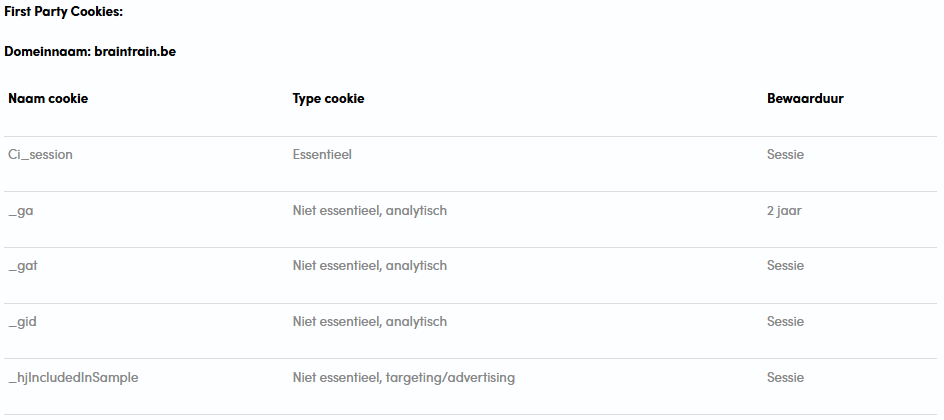
We distinguish the following types of cookies, according to their purposes:
- Essential / Strictly necessary cookies:
These cookies are necessary for the platform/website to function and cannot be switched off in our systems.
They are usually only set in response to actions made by you, such as setting your privacy preferences, logging in, or filling in forms.
They are necessary for proper communication and they facilitate navigation (for example, returning to a previous page, etc.). - Non-essential cookies:
These cookies are not necessary in themselves for the platform/website to function, but they do help us offer an improved and personalized website.- Functional cookies:
These cookies enable the platform/website to provide enhanced functionality and personalization.
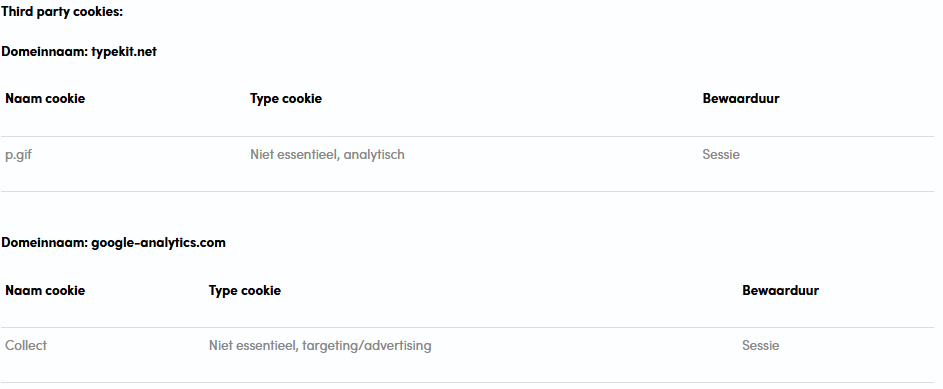
They may be set by us or by third-party providers whose services we have added to our pages. - Analytical cookies:
These cookies allow us to track visits and traffic so that we can measure and improve the performance of our platform/website.
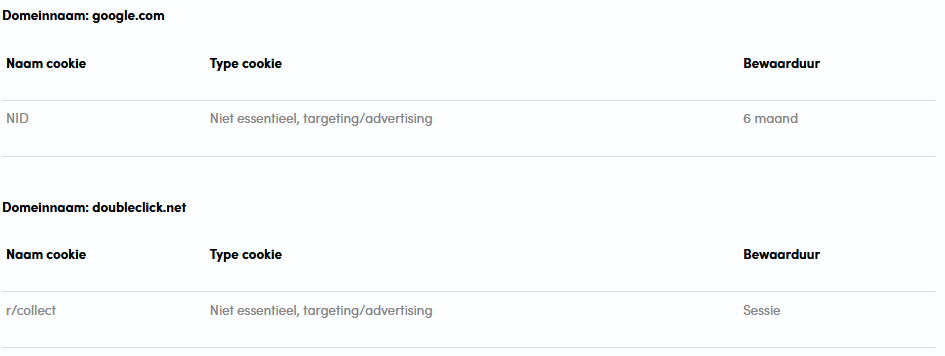
They help us know which pages are the most and least popular and how visitors move around the platform/website. - Targeting / advertising cookies:
These cookies may be set through our platform/website by our advertising partners.
They may be used by those companies to build a profile of your interests and show you relevant advertisements on other sites.
- Functional cookies:
We use our own cookies on the one hand, and cookies from carefully selected partners with whom we collaborate and who advertise our services on their website on the other.
4. Managing cookies
Ensure that cookies are enabled in your browser. To enable cookies, the following actions must be performed:
- For browser – Microsoft Internet Explorer
- In Internet Explorer, click on ‘Internet Options’ in the ‘Tools’ menu.
- On the ‘Privacy’ tab, move the settings slider to ‘low’ or ‘accept all cookies’ (setting above ‘medium’ disables cookies).
- Click ‘OK’.
- For browser – Mozilla Firefox
- Click on ‘Firefox’ in the top left corner of your browser and then click ‘Options’.
- On the ‘Privacy’ tab, ensure that ‘Tell websites I do not want to be tracked’ is not checked.
- Click ‘OK’.
- For browser – Google Chrome
- Click on the three dots next to the browser bar at the top of your browser window and choose ‘Settings’.
- Find the ‘Privacy and security’ section and click on ‘Site settings’.
- Click on the ‘Cookies’ option.
- Now select ‘Allow sites to save and read cookie data’.
- For browser – Safari
- Choose ‘Preferences’ from the task menu. (The task menu is located at the top right of the Safari window and looks like a gear, or click ‘Safari’ in the expanded task menu.)
Click on the Privacy tab. - Find the section named ‘Cookies and other website data’
- Indicate that you accept cookies
- Choose ‘Preferences’ from the task menu. (The task menu is located at the top right of the Safari window and looks like a gear, or click ‘Safari’ in the expanded task menu.)
If you wish to consult the BRAINTRAIN platform/website, it is recommended that you have cookies enabled. However, if you prefer not to, you as a visitor are free to disable cookies via your browser settings. This can be done in the following ways:
- For browser – Microsoft Internet Explorer
- In Internet Explorer, select the Tools button and select Internet Options.
- Select the Privacy tab and, under Settings, move the slider to the top to block all cookies. Click OK.
- For browser – Mozilla Firefox
- Click the menu button and choose ‘Settings’.
- Select the ‘Privacy & Security’ panel and go to the ‘History’ section.
- Next to ‘Firefox will’, set to ‘Use custom settings for history’.
- Set ‘Accept third-party cookies’ to ‘Never’.
- Close the ‘about:preferences’ page. Any changes you have made will be automatically saved.
- For browser – Google Chrome
- Select ‘Settings’ in the browser toolbar.
- At the bottom of the page, select the ‘Advanced’ option.
- Under ‘Privacy and security’, select ‘Site settings’.
- Select ‘Cookies’.
- Turn off ‘Allow sites to save and read cookie data’.
- For browser – Safari
- Choose ‘Preferences’ from the task menu. (The task menu is located at the top right of the Safari window and looks like a gear, or click ‘Safari’ in the expanded task menu.)
- Click on the Privacy tab. Find the section named ‘Cookies and other website data’
- Indicate that you do not accept cookies.
Or consult the help function of your internet browser for this.
5. Rights of visitors
Since cookies can constitute a processing of personal data, you as a data subject have the right to the lawful and secure processing of personal data. As a data subject, you can exercise the following rights:
- Right to object:
If there are compelling and legitimate reasons, one can object to the processing of personal data. - Right of access:
Every data subject who proves their identity has a right of access to information regarding the existence or non-existence of processing of their personal data, as well as the purposes of this processing, the categories of data to which these processings relate, and the categories of recipients to whom the data are provided. - Right to rectification:
Inaccurate or incomplete personal data can always be corrected or even erased at the request of the data subject.
The exercise of these rights takes place in accordance with the modalities as determined in our Privacy Policy.
More information about the rights of visitors can also be found in the Privacy Policy.
Should you still have questions or comments about cookies after reading this Cookie Policy, you can always contact us via bart@braintrain.be.